


Get Fluf.
Free forever for 2 workspaces and 6 agents, with 14 days of Pro included. No card. Runs on Mac, Windows and Linux.
On your phone? Fluf installs on your computer.
Fluf runs on a Mac, Windows or Linux computer. Send yourself the download link and install it there. Then reach your agents from this phone through a chat app or by pairing it.
We picked the right one for your computer.
Fluf for Mac.
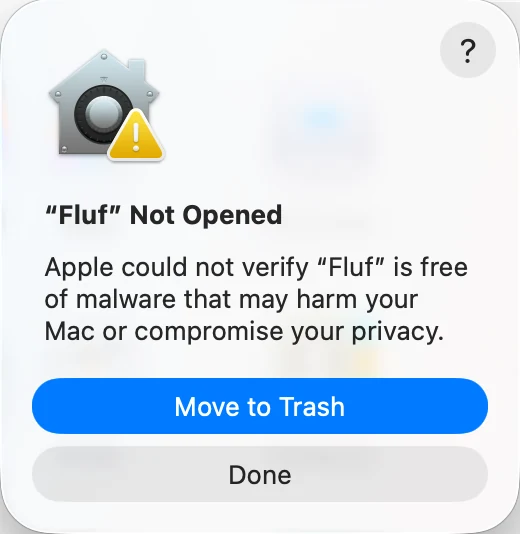
First openmacOS checks Fluf for a few seconds, then says “Fluf” Not Opened. Click Done, open System Settings › Privacy & Security, scroll to Security and click Open Anyway. You do this once.
We picked the right one for your computer.
Fluf for Windows.
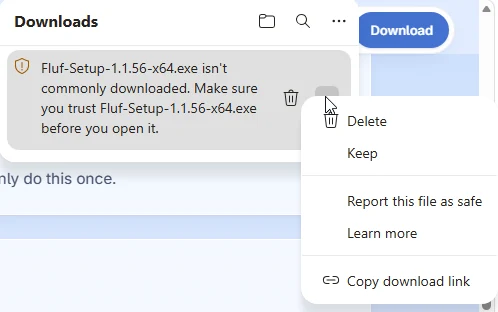
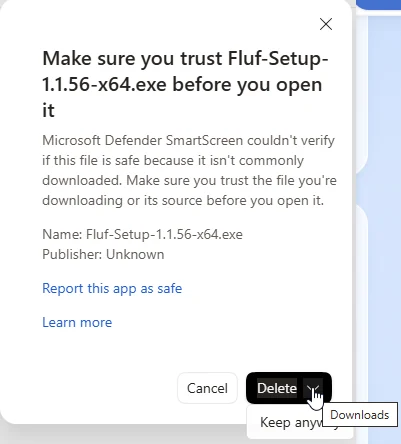
First openEdge says the installer isn't commonly downloaded: hover it, click ⋯ › Keep, then the arrow next to Delete › Keep anyway. If Windows shows “Windows protected your PC”, click More info › Run anyway. You do this once.
We picked the right one for your computer.
Fluf for Linux.
First openFirst open on Linux: the .deb installs like any app and updates itself. The AppImage runs on any distribution, no libfuse2 needed; mark it executable and open it.
SHA-512 checksums
Your download has started. Here's how to open Fluf the first time.
Open the downloaded Fluf disk image and drag Fluf into Applications. Open Fluf from Applications.
macOS checks Fluf for a few seconds, then says “Fluf” Not Opened. Click Done, not Move to Trash.
Open System Settings › Privacy & Security and scroll down to Security. Next to “Fluf” was blocked to protect your Mac, click Open Anyway. It stays there for about an hour after you tried to open Fluf.
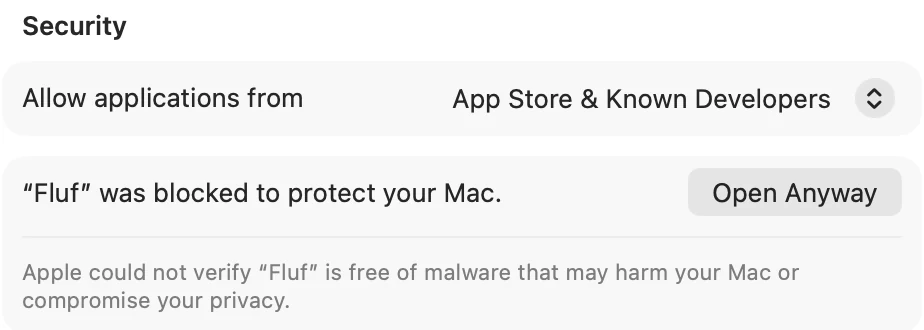
macOS asks one last time: click Open Anyway and enter your Mac password or use Touch ID. Fluf opens, and you never do this again.
Right-click › Open no longer skips this on macOS 15 and later. On macOS 14, Control-click Fluf in Applications and choose Open. Only approve a copy you downloaded from fluf.bot.
Your download has started. Here's how to open Fluf the first time.
Edge says Fluf-Setup isn't commonly downloaded. Hover the download, click ⋯ (More actions) and choose Keep.
Edge asks you to make sure you trust it. Click the arrow next to Delete and choose Keep anyway.
Click Open file under the download, then Install. Fluf opens from the Start menu when it's done.
If Chrome flags the download as uncommon or suspicious, open Downloads (the arrow at the top right), click the warning and choose Download suspicious file. Some versions say Keep.
Open the installer. If Windows shows “Windows protected your PC”, click More info, then Run anyway.
Click Install. Fluf opens from the Start menu when it's done.
If Windows says Smart App Control blocked Fluf, Windows offers no Run anyway: Smart App Control only lets through apps it already knows. Never switch off your antivirus to install anything. Only open an installer you downloaded from fluf.bot.
Up and running in five minutes
- Install FlufOpen the download and say hi to Pom.
- Connect a modelSign in with OpenRouter for free models, use your Claude Code or Codex login, or paste an API key.
- Hire your first agentHand it a real job and watch it work.
Good to know
- Your agents work on your computer while it's on and awake. The AI provider you use bills model usage directly.
- Computer use on Mac and Windows: set Allow, Ask or Never per app, and take over at any time.
- Or let Fluf run your installed Claude Code or Codex, signed in with your own login.